

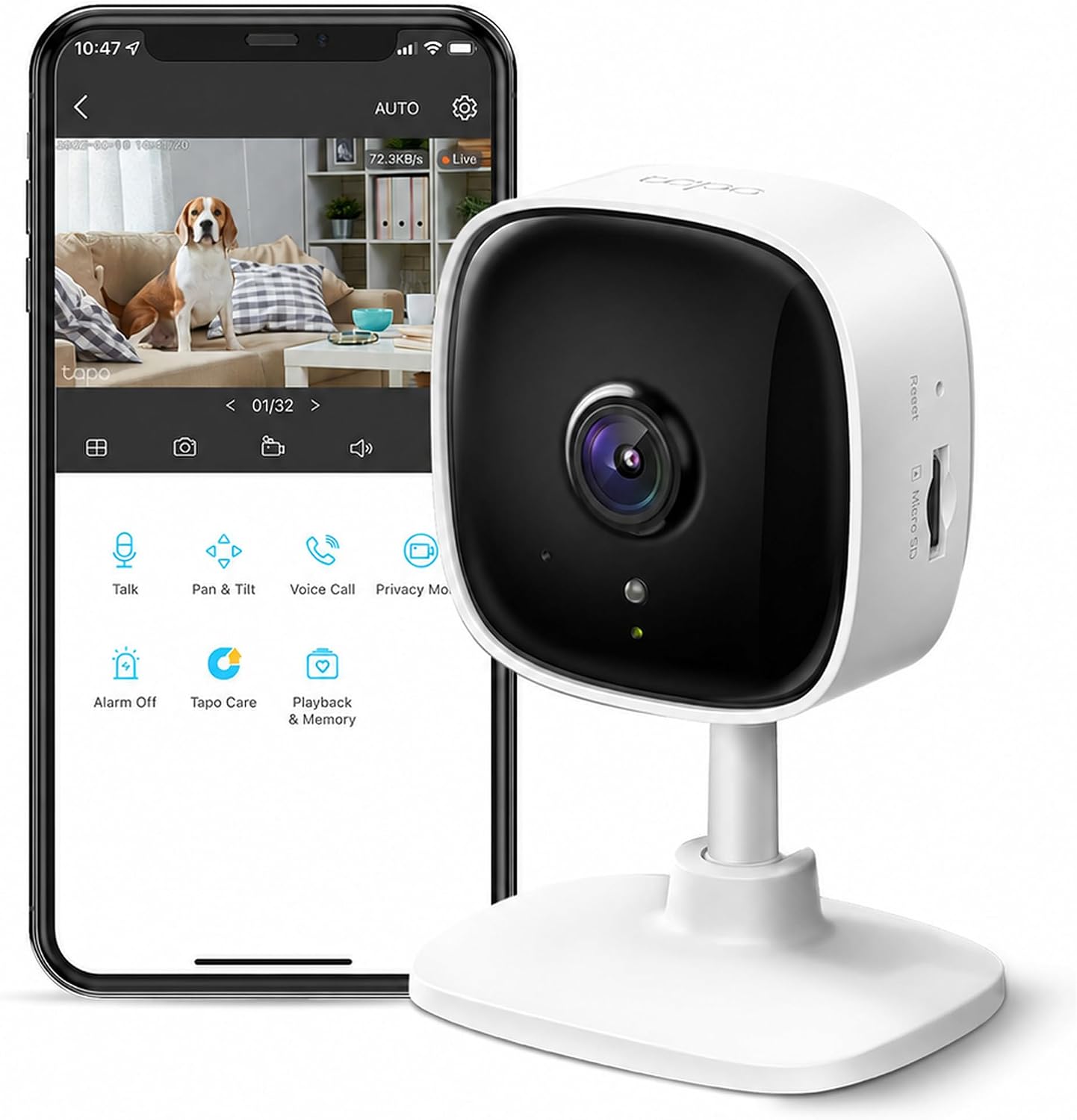
Tapo C100 Indoor Security Camera Review: 1080p Home Monitoring for Your Family, Pets and Peace of Mind
A home security camera used to mean a professional installation and a monthly contract. Today you can get a 1080p Wi-Fi camera that streams to your phone for less than the price of a pizza night for four. The Tapo C100 from TP-Link is one of the best-known budget options, and the listing shows it as a #1 Best Seller in Bullet Surveillance Cameras and #1 in Pet Cameras & Monitors. In this review we cover its features, what its specs really say (the listing contains a few contradictions we sorted out), how it fits into home security and baby or pet monitoring, and an honest look at using it to keep an eye on children playing in front of the house. You can check the current price on Amazon.
Overview: Why Shoppers Keep Choosing the C100
The listing shows 4.4 out of 5 stars from 29,197 ratings, more than 10,000 bought in the past month, and a limited-time price of $17.98 (28% off a $24.99 list price). A 2K version is also offered, but this review covers the 1080P model in white. The appeal is simple: a small camera, a free app, microSD storage, and compatibility with Alexa and Google Home at a very low price.
The Specs, Checked Against the Maker's Page
| Feature | Details |
|---|---|
| Model | Tapo C100 (TP-Link) |
| Resolution | 1080p (1920 x 1080), 2 MP sensor |
| Frame rate | 15 fps by default (TP-Link says up to 30 fps can be selected) |
| Field of view | About 110 to 117 degrees |
| Night vision | Infrared, 30 ft on the listing, 40 ft (12 m) on TP-Link's page |
| Audio | Built-in microphone and speaker, two-way talk |
| Siren | Yes (91 dB, according to TP-Link) |
| Detection | Motion, person, and baby cry |
| Wi-Fi | 2.4 GHz only |
| Storage | microSD card up to 512 GB, or Tapo Care cloud (subscription) |
| Voice assistants | Amazon Alexa and Google Assistant |
| Size and weight | 2.66 x 2.15 x 3.89 in, 9.5 oz |
| Warranty | 2 years (manufacturer) |
| In the box | Camera, power adapter, quick start guide, mounting screws, mounting template |
Listing Details That Don't Add Up
The Amazon listing has a few entries that contradict TP-Link's own specification page. They are worth knowing before you buy:
- Pan and tilt: The listing says "Yes", but TP-Link's published specs for the C100 show no pan or tilt range, so it appears to be a fixed camera. If panning matters to you, check this first.
- Weather rating: The listing includes both "IP65" and "Not Water Resistant", and also says "Indoor". TP-Link lists no IP rating and does not specify the C100 for outdoor use. Treat it as an indoor camera.
- Wattage: The listing says 24 watts, but the included adapter is 9 V at 0.6 A, which is roughly 5.4 watts.
- Memory: The listing mentions 128 GB of installed memory, but the box contents list no microSD card. Plan to buy one separately.
- Night vision: The listing says "Night Color", while TP-Link describes infrared night vision, so expect black-and-white footage in the dark.
Picture, Night Vision and Audio: What to Expect
At 1080p, the C100 gives a clear daytime picture of a living room, hallway, or nursery. The wide lens covers most of a standard room from a shelf or corner. At night, the infrared LEDs switch on automatically and the image turns black and white, with a range of about 30 to 40 feet depending on which source you trust.
Two-way audio lets you talk through the camera and hear a reply, which is useful for calming a pet, checking on a child, or saying hello to a delivery person you can see on camera. TP-Link states that the audio uses noise cancellation.
Smart Alerts, Siren and Privacy Mode
- Motion, person, and baby cry detection: The camera can notify you when it senses movement, a person, or a baby crying. You can set activity zones to ignore areas such as a window or a TV.
- Built-in siren: TP-Link rates it at 91 dB, measured at 10 cm. It is a deterrent, not a full alarm system.
- Privacy mode: The listing says the camera has a privacy mode, which stops viewing and recording when you want it off.
- Notifications: The listing states there is no additional fee for notifications.
Storage: microSD, Cloud and Costs
You have two options. A microSD card (up to 512 GB) records locally with no monthly cost. The Tapo Care cloud service is optional, and TP-Link says snapshots and clips in notifications require it. Pricing changes by region, so check the current rates in the Tapo app. For the lowest running cost, buy a good quality microSD card and skip the subscription.
The listing also mentions ONVIF and RTSP support and compatibility with NAS and NVR systems, which is useful if you already run a home recording setup.
Setting It Up in Minutes
- Plug in the camera and wait for the status light.
- Download the Tapo app and create an account.
- Add the camera and connect it to your 2.4 GHz Wi-Fi network. The C100 does not support 5 GHz and has no Ethernet port.
- Insert a microSD card if you want local recording.
- Place it on a flat surface, or use the mounting template and screws provided.
- Set up activity zones and notifications, and enable two-factor authentication on your account.

Home Security With a $20 Camera: What It Can and Can't Do
Visible cameras can influence burglars. A study from UNC Charlotte surveyed 422 incarcerated burglars in three US states. Nearly 60% said cameras or other surveillance would factor into their choice of target, and more than 40% said cameras would lead them to pick a different home. Those numbers come with caveats: the study was funded by the alarm industry, it reflects what offenders said they would do rather than what they did, and it is from 2013.
What this means in practice:
- A camera is one layer, not a complete system. Locks, lighting, and good habits still matter.
- Use it to see, not just to record. Live view and alerts let you check on things when you are away.
- Place it where activity happens. Entry halls, living rooms, and stairs inside the home are better positions than a blank wall.
- The C100 is an indoor camera. For a front door, driveway, or garden, you need an outdoor-rated camera.
Watching the Kids Play in Front of the House: Read This First
Many parents search for a camera to keep an eye on children playing near the front door. The honest answer has three parts.
1. The C100 is indoor-only. TP-Link does not specify it for outdoor use and lists no weather rating. Do not mount it outside.
2. Looking through a window has limits. You can place the camera on a windowsill or shelf facing the yard, which works well in daylight. At night, infrared light can reflect off the glass and wash out the picture. Camera makers suggest turning off IR and status lights at night, pressing the lens as close to the glass as possible, and keeping the glass clean. Direct sun on a windowsill can also push a camera past its 40°C (104°F) operating limit, so avoid hot spots. If you want reliable coverage of the front yard day and night, choose an outdoor-rated camera.
3. A camera does not replace supervision. Child safety guidance is clear that young children need an adult nearby:
- Sanford Health advises constant supervision whenever young children play outside, preferring a fenced yard and avoiding an unfenced front yard with heavy traffic. Its advice is written mainly for children aged 3 and younger, who lack impulse control and may run after a ball into the street.
- Kids and Cars recommends not letting the driveway become a play area, teaching children never to play near or behind a vehicle, and walking around the vehicle before moving it. It also warns against relying only on cameras or sensors. The organization cites 25 children under 14 killed in backover incidents in 2019.
A practical way to use the C100 for outdoor play: keep it by the front window to glance at the yard and use two-way audio to call children back from a boundary, but keep a responsible adult close by. For older children, it can help you see when they arrive home or stay within the area you agreed on.
Using It as a Baby, Nursery or Pet Camera
The listing markets the C100 as a baby monitor and a dog camera, and it ranks #1 in Pet Cameras & Monitors. Baby cry detection and two-way audio suit a nursery, and a pet owner can check on a dog, talk to it, or catch chewing and counter surfing.
A few safety points for nurseries:
- Keep cords away from the crib. The US Consumer Product Safety Commission advises keeping baby monitors and their cords at least 3 feet away from the crib to avoid strangulation hazards.
- Follow safe sleep guidance. A monitor is not a substitute for a bare, safe crib and regular checks.
- Mount high or use the included template so the camera and cord are out of a child's reach.
Keep Your Camera From Becoming a Privacy Risk
An internet-connected camera is only as safe as its settings. Security guidance from Norton and others suggests:
- Change default passwords and use a strong, unique password for your camera account.
- Turn on two-factor authentication in the Tapo app.
- Install firmware updates when they appear.
- Secure your router with strong encryption (WPA2 or better) and consider a separate guest network for smart devices.
- Turn off features you do not use, such as remote access.
Think about other people's privacy too. Do not point cameras at neighbors' windows or yards, and check local rules about recording in public spaces and recording audio. If a babysitter or guests are in your home, it is polite and sometimes legally required to tell them about indoor cameras.
Good Points and Trade-Offs
Good points:
- Very low price for 1080p video.
- Two-way audio, siren, and person and baby cry detection.
- microSD storage up to 512 GB, with no mandatory subscription.
- Works with Alexa and Google Assistant.
- Compact, light, and easy to place.
- ONVIF and RTSP support for advanced users.
- Strong rating and review volume, plus a 2 year warranty.

Trade-offs:
- Indoor-only, with no weather rating.
- Fixed camera, despite the listing's pan and tilt entry.
- 2.4 GHz Wi-Fi only.
- Night vision is black and white, with possible glare through glass.
- microSD card not included.
- Cloud clips and snapshots in alerts need a paid Tapo Care plan.
- Contradictory details on the listing, so check specs before buying.
Is $17.98 Worth It?
For under $20 at the current deal price (list price $24.99), the C100 offers more features than many cameras at twice the cost. Remember to add the cost of a microSD card. Prices change often, so check the latest listing.
Is This Camera for You?
It makes sense if you:
- Want an inexpensive indoor camera for a living room, nursery, or pet area.
- Prefer local storage over monthly fees.
- Want to check on the house or family from your phone.
- Use Alexa or Google Home.
You may want something else if you:
- Need a camera for the front door, garden, or driveway. Choose an outdoor-rated model.
- Want a camera that pans and tilts to follow movement.
- Use only a 5 GHz Wi-Fi network.
- Want full-color night vision.
Answers to Common Buyer Questions
Can I use it outdoors? No. It is described as indoor, and TP-Link does not list a weather rating.
Can I watch the front yard through a window? Yes in daylight, with limits at night because infrared light can reflect off glass. For dependable outdoor coverage, use an outdoor camera.
Does it need a subscription? No. microSD recording works without one. Tapo Care is optional and adds cloud features.
Does it pan and tilt? TP-Link's specs show a fixed lens. The listing says otherwise, so verify before you rely on it.
Which Wi-Fi does it use? 2.4 GHz only.
Does it work with Alexa and Google Home? Yes, according to the listing and TP-Link.
Is it good as a baby monitor? It has baby cry detection and two-way audio, but keep the cord at least 3 feet from the crib and follow safe sleep guidance.
Can it replace watching my kids? No. Use it as an extra set of eyes, not as supervision.
Our Take
The Tapo C100 is a simple, affordable way to add eyes to your home. It is a good fit for indoor monitoring of rooms, pets, and nurseries, and a practical add-on to a wider security routine. It is not an outdoor camera, it does not pan or tilt (despite what the listing says), and it should never replace an adult watching children near a street or driveway. Prices change often, so check the latest deal on Amazon before you buy.
This article is for general information and is not a substitute for professional security or child safety advice.
Sources and Further Reading
- TP-Link Tapo, Tapo C100 specifications
- Security Magazine, Study says convicted burglars confirm value of alarms, other deterrents
- Reolink, Do security cameras work through glass or behind a window?
- Sanford Health, Keep young children safe while playing outside
- Kids and Cars, How to prevent backover car accident deaths
- U.S. Consumer Product Safety Commission, Top tips for safer spaces for baby
- Norton, Tips to secure your smart home and IoT devices